


Most operators never buy a single system anyway. They buy a POS, add the module their POS is weakest at, then wire the whole thing into accounting.
Contents
The 10 options at a glance
Hardware, processing rates, offline mode, and contract length are POS-buying questions, and the best POS system for restaurants guide is the better place to settle those. If you want to price the food-cost side before any demo, the restaurant food cost calculator does that in a few minutes.
| Product | Best for | POS scope | Inventory and costing | Labor and scheduling | Accounting and AP | Pricing |
|---|---|---|---|---|---|---|
| TabUse it with your restaurant software for cards, receipts, and spend by restaurant |
If card spend and receipt cleanup are the only gaps, Tab may be the only new tool you need. Add the POS, inventory, labor, or accounting platform that handles the rest of your operation. Get started free |
|||||
| Restaurant365 | Groups with a controller or finance team | No POS, sits behind yours | Counts, recipes, variance | Scheduling in the suite | Full GL plus AP | Custom quote |
| Toast | One vendor for almost everything | Own POS, KDS, hardware | xtraCHEF invoice module | Toast scheduling module | Invoice capture, no GL | Custom quote, modules priced apart |
| Lightspeed Restaurant | Complex menus and multi-unit inventory | iPad POS plus floor plans | Ingredient level | Through integrations | Through integrations | Quote required |
| Square for Restaurants | First locations and pop-ups | iPad and Square hardware | Basic, tier-gated | Add-on module | Exports, no GL | Published tiers |
| TouchBistro | Table service independents | iPad POS, modular add-ons | Basic ingredient tracking | Add-on module | Through integrations | Quote required |
| SpotOn | Operators who want it installed for them | Own POS plus hardware | Basic | Add-on module | Through integrations | Custom quote |
| MarginEdge | Food cost on top of any POS | None | Invoices, recipes, daily P&L | None | Bill pay, exports to your GL | Flat per location |
| 7shifts | Labor cost control | None | None | Scheduling, time clock, tips | Payroll add-on | Free tier plus paid tiers |
| Craftable | Bar-forward groups | None | Food and beverage counts | None | AP automation with OCR | Custom quote |
| Oracle MICROS Simphony | Stadiums, airports, global chains | Enterprise POS and KDS | Enterprise inventory | Through Oracle modules | Enterprise back office | Custom quote |
Vendor prices checked on each company's own pricing page, July 21, 2026.
Tab Commerce - use it with your restaurant management software

Use Tab on its own for controlled restaurant cards, receipts, and purchase coding. If you also need POS, inventory, labor, scheduling, or accounting, keep that work in the specialist platform and let Tab send it cleaner purchase data.
- Set limits by manager and restaurant before anyone swipes the card.
- Collect the receipt and restaurant by text instead of chasing both at month end.
- Send coded spend to QuickBooks Online through a full integration, or export it for another ledger.
"We looked at other expense systems but it just didn't compare to the technology that Tab has."
Teresa, Accounting Specialist, Rock Strategic (75+ units)
Price: Base is free. Pro is $150 per location per month and adds Andy AI. Groups with 5+ locations get custom pricing.
The 10 best restaurant management software options in 2026
1. Restaurant365 - the all-in-one back office, if you can absorb the implementation

One login covers the general ledger, inventory counts, recipe costing, and scheduling, which is why it is the default for groups past 20 units with a real finance team.
- A delivery invoice hits food cost and the GL in the same pass instead of being keyed twice, because the accounting, inventory, and operations suites are connected rather than integrated. (Restaurant365 operations)
- Counts, recipes, and variance reporting are first-party, so theoretical versus actual food cost comes out of the same system that holds the invoice. (Restaurant365 inventory)
- Multi-entity structures are the design target, which is what separates it from a POS back office when you run several LLCs across one management company.
- Reviewers on G2 return to setup complexity and a steep learning curve on the inventory side. (G2 reviews)
Pricing: Custom quote, with no dollar figures published. (Restaurant365 pricing)
What to weigh Restaurant365 needs someone to own the rollout and ongoing setup. A three-unit group without a controller may use only a fraction of what it pays for.
If accounting is the actual question behind your search, the best bookkeeping software for restaurants guide goes deeper on daily sales journals, multi-entity consolidation, and exports.
2. Toast - the POS-led platform with the deepest module list, and the most pricing complexity

If you want one vendor for terminals, kitchen displays, online ordering, loyalty, invoices, and scheduling, Toast covers more of that stack than any other restaurant POS.
- The module lineup runs from POS and KDS through online ordering, loyalty, and xtraCHEF invoice and food-cost tools, so the back office grows without a second contract. (Toast pricing)
- Scheduling and team tools are Toast modules too, which means labor, sales, and menu data share one dataset instead of syncing overnight.
- There is still no general ledger in the stack, so a Toast group closes its books in QuickBooks Online, Restaurant365, or Sage regardless of how many modules it turns on.
- G2 reviewers raise support consistency and pricing complexity more than any other theme. (G2)
Pricing: Custom quote, with each module priced separately and no public tier numbers on the pricing page as of its July 8, 2026 update. (Toast pricing)
What to weigh Toast bundles hardware and payment processing. The cost of changing both becomes part of the comparison for operators who want to keep their current processor.
3. Lightspeed Restaurant - the iPad POS for complex menus and multi-location inventory
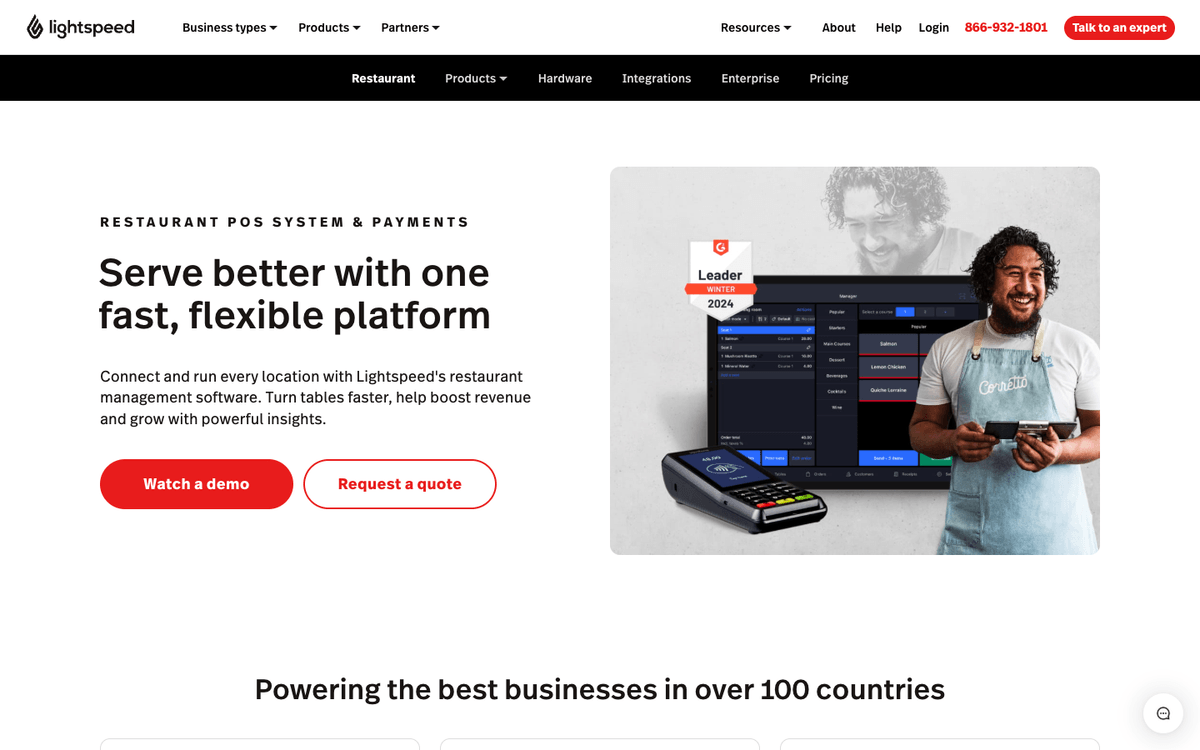
Best when the menu itself is the complexity: long ingredient lists, heavy modifiers, and floor plans that change between service periods.
- Menus and floor plans are customizable down to the table, and inventory tracks at the ingredient level rather than the menu-item level. (Lightspeed Restaurant)
- Multi-location management and real-time reporting are first-party, so a two-concept group sees both under one login instead of exporting each site separately.
- Labor, accounting, and AP arrive through integrations, which keeps the POS light and puts the burden of vendor selection back on you.
Pricing: Quote required, with plan numbers gated behind a sales conversation. (Lightspeed Restaurant)
What to weigh Lightspeed does not combine scheduling and payroll in the same suite. Groups that want both from one vendor would need an additional tool.
4. Square for Restaurants - the fastest start for new concepts, with tiers you outgrow

Square is the rare restaurant POS that publishes its plan prices and ships a usable free tier, which makes it the low-risk first system for a first location.
- Card processing runs from 2.6% down to 2.4%, plus 15 cents a swipe, as you move up the plans, which matters more than the subscription once sales are real. (Square for Restaurants pricing)
- KDS and kiosk are priced as separate add-ons, so a counter-service build costs more than the headline plan suggests.
- The deeper tools sit in Plus and Premium, and high-volume operators report hitting the ceiling. (POSUSA review)
Pricing: $0, $49, and $149 per location per month across Free, Plus, and Premium. (Square for Restaurants pricing)
What to weigh Square's lighter inventory may become limiting when ingredient-level counts expand beyond two or three locations.
5. TouchBistro - the table-service iPad POS, with pricing you have to ask for

Built around table service, coursing, and floor plans, which is why full-service independents choose it over a counter-service-first system.
- The core is an iPad POS with modules layered on, so reservations, online ordering, and loyalty only cost money when you turn them on. (TouchBistro product guide)
- Table service is the design center, with coursing, seat-level ordering, and floor plans built in rather than a counter-service system adapted to a dining room.
- Reviews split on support responsiveness and on how deep some of those modules actually go. (TrustRadius)
Pricing: Quote required. Verify current plan numbers with TouchBistro directly before budgeting.
What to weigh TouchBistro does not combine multi-unit counts and labor in one platform. Groups needing both would still run another system.
6. SpotOn Restaurant - the white-glove rollout pick, on proprietary hardware

SpotOn sells the install as much as the software, so it fits operators who want a person on site rather than a setup wizard and a help center.
- Hardware, online ordering, and marketing tools all come from SpotOn directly, which keeps the vendor count at one. (SpotOn Restaurant)
- Inventory and labor stay basic, so a group serious about counts or scheduling still buys MarginEdge, Craftable, or 7shifts on top.
- Third-party reviews flag sales pressure during the buying process and an uneven post-sale experience. (POSUSA review)
Pricing: Custom quote through sales. (SpotOn pricing)
What to weigh SpotOn's rollout assumes its own terminals. Existing hardware may not carry over, so replacement cost belongs in the comparison.
7. MarginEdge - the inventory and recipe-costing layer that pairs with any POS, at $350 per location

The cleanest way to get daily food cost without replacing the POS or moving the general ledger.
- Invoices are digitized line by line, so recipe costs and daily P&L update against this week's vendor prices instead of last quarter's. (MarginEdge pricing)
- Bill pay and accounting exports sit in the same subscription, which is why it slots behind QuickBooks Online, Restaurant365, or Sage Intacct rather than competing with them.
- Bundled with Freepour for beverage programs it runs $500 per location per month, and Toast users add $50 per location per month for the API connection. (MarginEdge pricing)
- Reviewers describe a real learning curve on terminology and process before the numbers get trustworthy. (G2 reviews)
Pricing: $350 per location per month. (MarginEdge pricing)
What to weigh MarginEdge handles invoices, inventory, and food cost, but it is not a general ledger. Groups replacing accounting would still need a ledger.
Two next reads branch off this one: MarginEdge alternatives compares the inventory field, and Tab vs MarginEdge Card covers the card side that MarginEdge now sells too.
8. 7shifts - the labor and scheduling pick, with no ledger and no inventory

Labor is usually the second-biggest line on a restaurant P&L, and this is the tool that actually moves it.
- Scheduling, availability and time-off requests, time tracking, and team messaging live in one app managers already keep open on their phones. (7shifts scheduling)
- POS integrations feed sales in, so labor cost shows up against sales while the schedule is being built, not after payroll runs.
- Plans are gated by headcount, not just by feature: Essentials covers up to 30 employees, Pro up to 60, and Premium goes unlimited at $134.99 per location per month plus $6 per employee paid. (7shifts pricing)
- Payroll is a separate $39.99 per location per month plus $6 per employee paid, and comes included on Premium. Android users report notification delays in current reviews. (G2 reviews)
Pricing: Free for one location with up to 15 employees, then $39.99 per location per month for Essentials. (7shifts pricing)
What to weigh 7shifts handles labor, not food cost or accounting. It would sit beside a POS and accounting system.
Tip pooling, time-clock rules, and the rest of the plan ladder get a full walkthrough in the restaurant scheduling software guide.
9. Craftable - the AP and inventory pick for bar-forward groups, priced on request

Built for programs where beverage cost is the margin story, with AP automation attached to the counts rather than sold separately.
- Invoices run through OCR and get checked for overcharges and price variances, so vendor creep gets caught at entry instead of at month end. (Craftable AP automation)
- Inventory and recipe costing cover food and beverage together, which matters when the bar and the kitchen share vendors. (Craftable inventory)
- Users report meaningful setup effort around recipe mapping and integration work. (Software Advice)
Pricing: Custom quote. Craftable publishes no plan numbers.
What to weigh Craftable's beverage depth is most valuable when beverage is a meaningful share of sales. Food-led concepts may get similar value from a narrower tool with less setup.
If purchasing is the whole project, the best restaurant procurement software roundup covers ordering and vendor tools in more depth.
10. Oracle MICROS Simphony - the enterprise POS backbone, overkill under 20 locations

The choice when the requirement is thousands of transactions an hour across stadium concourses, airports, or a global franchise system.
- Built for enterprise and venue scale, with integrated hardware and mobile ordering designed for high-volume, distributed sites. (Oracle Simphony)
- Inventory and back-office capability arrive as Oracle modules, so the buying decision is a platform commitment rather than a POS purchase.
- Reviewers describe implementation as a partner-led project with real timelines, and support quality that varies by region. (G2 reviews)
Pricing: Custom quote, scoped with Oracle or an implementation partner.
What to weigh Simphony's configuration usually needs IT support or an implementation partner. That ownership and service cost belongs in the comparison.
Which should you choose?
Two questions settle most of this before any demo.
Will you accept the vendor's hardware and card processing? If not, cross off Toast, SpotOn, and Square, and build around Lightspeed or TouchBistro with best-of-breed modules behind them.
What runs your books? QuickBooks Online groups can stay best-of-breed and keep the POS simple. Restaurant365 replaces the accounting system, so choosing it is a migration, not a purchase. Sage and NetSuite shops need the POS and inventory tools to export cleanly rather than own the ledger.
Then match the shape of the group:
Opening a first or second quick-service spot.
Square for Restaurants, plus 7shifts once you pass a dozen employees.Add Tab when managers need controlled cards and automatic receipt prompts; the Base plan is free.
One to five full-service restaurants.
TouchBistro or Lightspeed, MarginEdge for food cost, 7shifts for labor.Use Tab for card limits, receipts, and restaurant coding, so those jobs stay separate from the POS.
Six to twenty locations.
Toast with its own modules, or Toast plus MarginEdge when food cost is the leak, plus 7shifts.Use Tab for spend by restaurant and company, with receipt replies back in about 90 seconds on average.
Twenty or more locations with a finance team.
Restaurant365 for the back office, your existing POS in front, 7shifts for labor.Use Tab for restaurant cards and clean coded spend before it reaches the finance team.
Franchise or venue scale.
Oracle MICROS Simphony, Restaurant365 behind it, 7shifts for labor.Use one Tab login across the group to control cards and split spend by restaurant and company.
If the AI add-ons in these demos are the part you cannot judge, AI for restaurants: real use cases and examples separates what is shipping from what is still a slide.
Common questions
Budget in three lines, not one. The POS subscription is the smallest of them. Inventory and labor tools each add their own per-location charge on top.
Card processing is the line that surprises people, because it scales with sales rather than with locations and usually outruns every subscription combined within the first year.
POS modules win on setup and on getting one bill. Dedicated tools win on depth: ingredient-level counts, variance reporting, tip rules, and forecasting.
The real test is whether anyone on your team will actually run a weekly count. If nobody will, the POS module is the better buy, because it is the one that will get used.
Yes, and most groups should. Run the POS for a quarter and let the P&L say whether food cost or labor is the bigger leak, then buy that tool next.
The one thing to check up front is whether the POS exposes sales and menu data through an open API, because that is what every later tool plugs into.

James writes from Tab's work with restaurant groups choosing cards, fixing missing receipts, coding spend, and closing the books. Tab brings cards, accounts, receipt automation, and Andy AI into one restaurant back office.


